

How to Create SOPs as Your Team Grows (+ FREE Template)
July 31, 2026
For a long time, your business ran on you. You knew how every task got done because you were the one doing it. Then you brought people in, and something shifted. The same questions keep landing back in your inbox. A task you’d swear was simple gets done three different ways by three different people. Onboarding a new client depends on you remembering the order you do things in.
None of this was a problem when it was just you. It is now.
This is where SOPs stop being a someday idea and start being the thing that gets the work out of your head and into your team. Here’s how to write standard operating procedures your team will actually use, and where to start.
Just want the SOP template?
The template this guide is built around lives inside The Art of Letting Go, my free 6-step framework for stepping out of the day-to-day.
Download it here and fill it out as you go.

Why your processes only started breaking now
When you are the whole business, your processes are invisible. There is nothing to document, because you are the process. You hold the order of operations, the exceptions, the “oh, except when it’s this client” rules, all of it, in your head. It works.
Add people, and every one of those invisible steps becomes a question. Or a mistake. Or a thing that quietly slips through the net. Your team is good. They’re just not mindreaders.
An SOP gets your standard out of your head and into someone else’s hands without you standing over their shoulder. You hand over the task and the standard that comes with it.
What to document first, before you write anything
The reason most founders never start is that they try to document everything at once. It’s too big, so it never happens.
You have a choice about where to begin, and the choice matters more than the writing. This is the quick version of the Systems Audit inside The Art of Letting Go. Rate each area of your business from 1 to 5:
- 1 = chaos, it’s all in my head
- 5 = fully documented, the team runs it without me
Run through the eight areas the audit covers:
- Client onboarding
- Client offboarding
- Team communication
- Project management
- Content creation
- Email and inbox
- Finance and invoicing
- Reporting and analytics
Then look for the overlap: a process that’s both all in your head and high-frequency. That’s where the bottleneck lives, and that’s your first SOP. Pick the one that keeps coming back to you, even if a tidier, less urgent one would feel more satisfying to write.
How to write an SOP that survives a growing team
Most SOP templates you’ll find online are three columns and a list of steps. They tell you what to do and in what order, and not much else. That’s fine until a real team gets hold of it. Then the gaps show. Who owns this? Is it still current? What do I do when something goes wrong and you’re not around to ask?
The structure I use is built to answer those questions, because those are the questions a growing team actually asks. There are eight parts to it:
- Document control
- Purpose
- Scope
- Policy
- Tools, access and resources
- Stages and workflow overview
- The detailed steps
- Escalation path
To keep it concrete, here’s each part run through one real example: a client onboarding SOP.
1. Document control
This is the part almost every online SOP skips. Don’t! It’s what turns a document into a living system. It sits at the top of the SOP and holds the details that keep it usable: an SOP code so you can reference it (OPS-001, and so on), a version number, a status (draft, live or archived), the owner, the date created, the date last updated, the next review date and who approved it.
Underneath, three quick fields tell the reader how the task fits into real life: how often it runs (daily, weekly, monthly or ad hoc), roughly how long it takes and whether it’s internal, client-shareable or confidential.
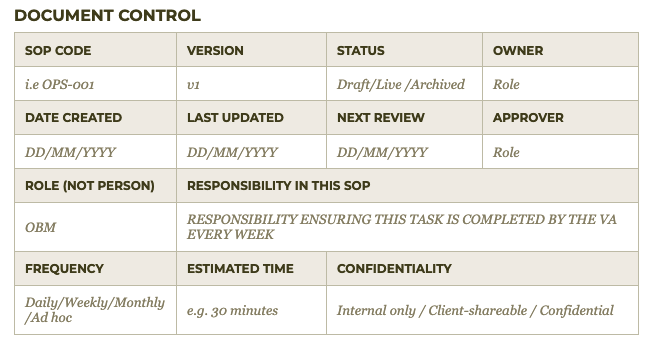
It sounds unnecessary. But this is what stops your SOPs quietly going out of date a month after you write them. A document with a review date has someone responsible for it. One without is a file nobody quite trusts.
Assign it to a role, not a person. The owner of an SOP is “the OBM” or “the VA,” never “Sarah.” An SOP tied to Sarah breaks the day Sarah is off, and it dies the day Sarah leaves.
2. Purpose
Why the SOP exists and the outcome it delivers, in two or three sentences. For client onboarding: to take a new client from signed contract to kick-off call with everything set up, so nothing gets missed and they feel looked after from day one. Purpose is the why. Everything under it is the how.

3. Scope
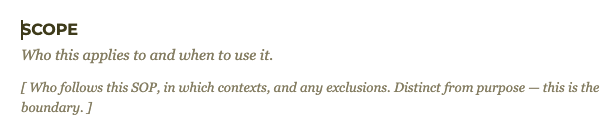
Who the SOP applies to, when it applies and what it doesn’t cover. This is the boundary, and it’s distinct from purpose. Your onboarding SOP might cover retainer clients only, and explicitly leave out one-off strategy sessions, which run differently. Scope stops people applying the right process to the wrong situation.
4. Policy
The standards and rules the task has to meet. Brand guidelines, tone, compliance points, response times. For onboarding, that might be: the welcome email goes out within 24 hours of the contract being signed, no exceptions. Policy is where your standard actually lives on the page.

5. Tools, access and resources
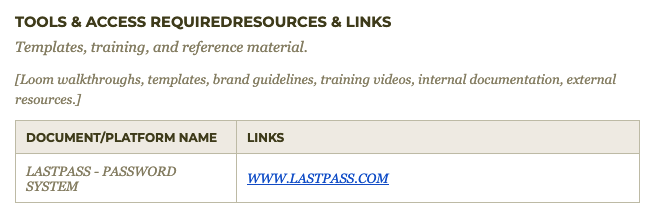
Everything needed to do the task, linked out. The CRM, the welcome email template, the onboarding questionnaire, the folder structure, the logins, the Loom that shows the fiddly bit. If someone has to come and ask you where the template lives, the SOP hasn’t done its job. Link it all.
6. Stages and workflow overview
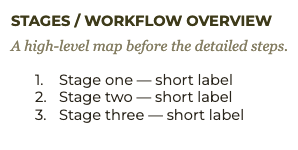
A high-level map of the whole task before anyone gets into the detail. Three or four stages, short labels, in order. For onboarding: contract and payment, then welcome and questionnaire, then setup, then kick-off call. The overview lets someone see the whole shape before they start.
7. The detailed steps
Now the step-by-step, written for a person doing it for the very first time. No assumed knowledge, no waffle. Under each stage from the map above, the actual clicks: which button, which template, which folder. This is the part most people picture when they hear “SOP.” It only works when the seven other parts are around it.

8. Escalation path
This is the section that answers the fear you started with. It names the trigger (what counts as “something’s gone wrong”), who to escalate to and how (Slack, email or a quick call).
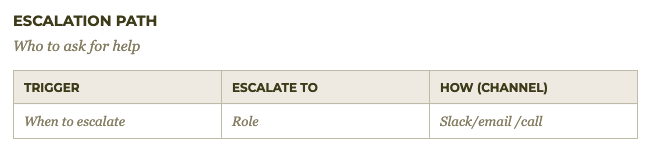
It’s what lets you tell your team “don’t come straight back to me” and mean it. When the escalation path is written down, a problem has somewhere to go that isn’t your phone. That one section is what separates handing over a task from handing over a task with a safety net underneath it.
Get those eight parts down, and you don’t have a document. You have something the team can run.
How to actually capture the process
The reason most people find creating SOPs difficult is that they sit at a blank page and try to remember every step from cold. They get three steps in, realise they’ve missed something, and give up. Writing from memory is slow, and you always miss the small stuff.
So don’t. Capture the task while you’re already doing it. It’s how I write mine.
Next time you onboard a client, catch it as you go: screen-record it, talk it through as a voice note or let a tool like Scribe record your clicks and turn them into a step-by-step draft for you. You were doing the task anyway. Narrate it once, then shape that into the template.
There’s also a ready-to-use prompt inside my Art of Letting Go resource that you can put into an AI tool to help turn what you’ve captured into a clear SOP.
The time it takes to record one is always less than the time you’ll spend re-explaining it forever.
Rolling it out so the team actually uses it
Writing the SOP is half the job. Getting the team to actually use it is the half that gets it out of your head for good.
Three things make the difference.
- Keep them in one central, findable home so they’re not scattered across Google Drive, Slack or someone’s desktop. We keep ours in our project management tool should be doing for you. You could also create a simple directory in a spreadsheet or Airtable, with links to every SOP.
- Hand them over properly. When you delegate a task, link the SOP in the brief and let it do the explaining. Don’t talk someone through the whole thing and attach the doc as a backup nobody reads. Attach the doc and let it lead. That’s the entire point of having written it.
- Let the review date do its job. The review date on each SOP is what keeps the system alive. When it comes up, the owner checks it still matches how the task is really done, and updates it. A process reviewed every quarter stays trustworthy. One written once and never looked at again slowly stops being true.
Get the FREE SOP template
You’ve now got the structure and the method. The last thing that helps is not rebuilding the format from scratch every time.
Before you download anything, do the quick version of the audit. Which of your processes is still a 1 out of 5, all in your head and happening often? That’s the one to build first.
The SOP template sits inside The Art of Letting Go, my 6-step framework for founders stepping out of the day-to-day. You’ll find the template in Step 4, Systems and Processes, with the full structure above ready to fill in.
The goal was always the same: a business that runs the day-to-day without every question routing through you. Documentation is just how you get there. Pick the one process that’s still living in your head, record yourself doing it this week and you’ve started.
FAQs
What is a standard operating procedure?
A standard operating procedure (SOP) is a documented set of instructions for completing a recurring task the same way every time. It records the steps, the standard they need to meet and who is responsible, so the task doesn’t depend on one person remembering how it’s done.
What should an SOP include?
A useful SOP includes document control (version, owner, status and review date), the purpose and scope, any policies or standards it must meet, the tools and access needed, step-by-step instructions and an escalation path for when something goes wrong. Document control and the escalation path are the two sections most SOP templates leave out.
How do you write an SOP for a small team?
Capture the task while you’re doing it by screen-recording or voice-noting yourself once, then shape that recording into a fixed template. Assign ownership to a role rather than a named person, store it somewhere everyone can find and set a review date so it stays current as the team grows.
Which processes should you document first?
Start with the processes that are both high-frequency and still only in your head. Rate each area of your business from 1 (all in my head) to 5 (the team runs it without me), and document the low-scoring, high-frequency ones first. Common starting points are client onboarding, offboarding and team communication.
How often should SOPs be reviewed?
Give each SOP a review date, commonly every three to six months, and assign it to the role that owns the process. Reviewing on a schedule is what stops SOPs going out of date and losing the team’s trust.
How long should an SOP be?
Long enough for someone to complete the task correctly on their first attempt, and no longer. Use a high-level stages overview for context, then detailed steps and link out to templates and videos rather than padding the document.
on instagram